
Download Kinisma Studio
The desktop app is where you talk to the Video Agent and where your videos are made. Free to start: 3 videos a month, no card needed.
macOS
Apple Silicon Macs only (M1 or later), macOS 13 Ventura or later. Not for Intel Macs · Version 1.2.0Seeing “Windows protected your PC”?
The installer is signed by Argentron Technologies, the company behind Kinisma. It's new, though, and Microsoft SmartScreen warns about any app it hasn't seen many people install yet. To continue:
- Click More info in the blue window.
- Check that the publisher ends with Argentron Technologies Private Limited, then click Run anyway.
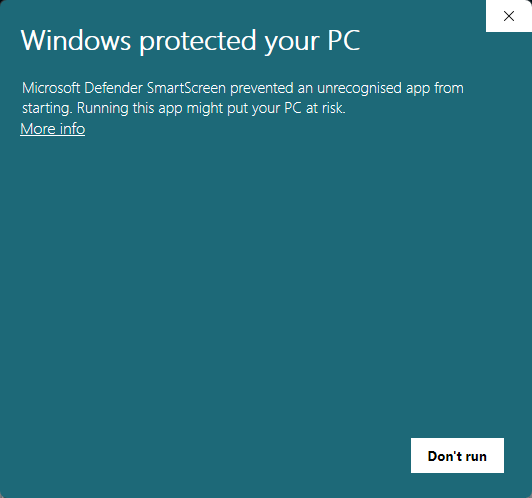
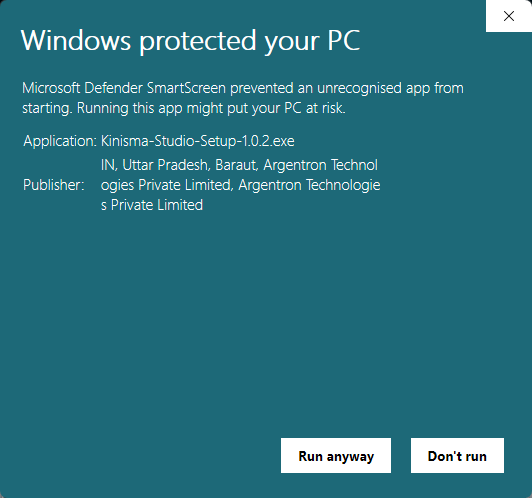
If Edge says the file “isn't commonly downloaded”, open the … menu next to it, choose Keep, then Keep anyway.
Get started
From install to your first video
01
Install the app
Run the installer for your computer and open Kinisma Studio.
02
Sign in
Use your Kinisma account, or create one free in the app.
03
Choose how the AI is paid
Connect your own OpenRouter key, or use Kinisma credits.
04
Describe your video
Say what you need. The agent researches, writes, builds and voices it.
Questions
Yes. The app is free to download and the Free plan gives you 3 videos a month with your own AI key — no card needed.
Already have the app?
Manage your projects, credits and devices from the web dashboard.